Every site you sign up for asks for your email. Most will spam it, sell it, or leak it sooner or later. An email alias is a separate forwarding address you hand out instead of your real one: the site gets something like storename@yourhandle.aliasfleet.me, the mail still lands in your inbox, and your real address never enters their database. That is the whole trick. If you want the full definition first, start with what an email alias is. This page is about what to do with them.
How to use email aliases without overthinking it#
One alias per site. Name it after the site, so your alias list reads like a map: amazon@, spotify@, airline@. Under the hood an alias is just a mail-routing rule (it is in the SMTP spec itself), not a mailbox. When a breach hits, you switch off one alias. When spam arrives, the To field names the culprit. Everything below is where to point that first.

1. Online shopping#
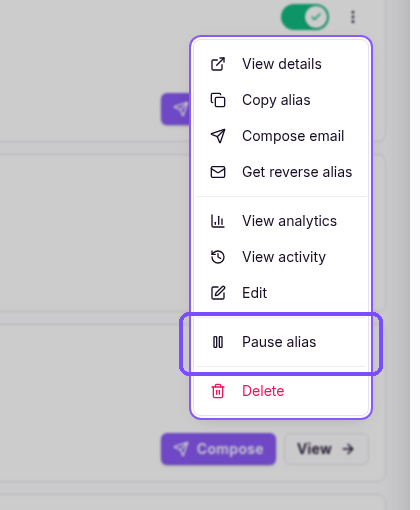
Say you get an order confirmation for something you never bought. Before you panic, check the To field. If it shows the alias you gave a shoe store six months ago, two things are true at once: the email was never meant for you, and that shoe store's customer database is floating around somewhere. You switch off the alias and move on with your morning.
Without it, you would be staring at your real address in the To field, wondering which of the forty stores you have ever bought from leaked it. Breaches like the Times Car one are how this happens at scale: customer records, email addresses included, end up for sale, and the buyers do not care what you ordered.
2. Newsletters#
Every newsletter signup is a bet the sender will behave. Some do. Most are sending three emails a week by month two. Give newsletters their own alias, something like news@, and you get a kill switch instead of an unsubscribe maze.
One click beats ten "are you sure" screens.
3. Free trials#
Trials ask for your email because trials want to become subscriptions. Use one alias per trial. Convert, and you keep it. Don't, and the win-back emails go to an address you can switch off. Curiosity shouldn't cost you a year of "we miss you" emails.
4. Social media#
Social networks are breach magnets and data brokers in one package. Give each one its own alias. When (not if) one of them leaks, your banking and shopping addresses are untouched. Boring advice. Boring is the point.
5. Job hunting#
Your CV goes into applicant tracking systems with breach histories and data-sharing deals you will never read. Use a dedicated alias for the hunt: jobs@, or one per serious application. When the search ends, switch it off, and the recruiter spam ends with it.
Worth doing anyway: check Have I Been Pwned now and then. The big recruiting platforms show up there, and if your address is already in one, here is what to do about it.
6. Marketplaces#
Classifieds, auction sites, buy-and-sell groups. Strangers do not need your real address to buy your old bike. One alias for selling, switched off when the item is gone. If a buyer turns weird, the address turns dead.
7. Giveaways#
Free phone. Free cruise. Free nothing. Giveaways exist to harvest addresses, so give them an alias and let it absorb the fallout. Assume the worst here; you will usually be right.
8. Gaming accounts#
Your game library is worth real money these days, which makes gaming accounts a target. Give Steam, Epic, and the rest each their own alias. Gaming breaches happen all the time. When one does, the damage stops at that one alias instead of spreading to every account that shares your address.
9. Banking, and the phishing test#
Keep your real address for the bank itself. Give everything adjacent (the budgeting app, the tax tool) its own alias.
Now the part worth slowing down for. When a phishing email arrives claiming to be your bank, check the To field. If it came to your shoe-store alias, it is fake. Full stop. Your bank was never given that address, so no link inspection or header forensics needed; the alias did the detecting before you finished your coffee.
This is not theoretical. The Medela breach showed the playbook running in the wild: stolen contact data paired with job titles, turned into spear phishing believable enough to fool busy people. The alias doesn't care how believable the email looks. Wrong address, wrong sender, done.
10. Travel bookings#
Airlines, hotels, booking platforms. Travel databases get breached and they get sold, and the "exclusive deals" follow you for years. One alias for bookings keeps the promo mail quarantined to an address you can pause between trips.
11. Freelancing#
Clients need to reach you; they do not need your personal address. One alias per serious client looks professional and keeps a boundary. When the contract ends, so does the address. No awkward "please stop emailing me" conversation required.
12. Schools, clubs, and family admin#
The school, the doctor's surgery, the football club. Give the family-admin stuff one shared alias. School portals leak more often than anyone admits; when one does, you rotate a single address instead of updating every parents' list you are on. The football club does not need the address your bank has.
Email alias vs disposable email#
People mix these two up. They are opposites.
| Feature | Email alias | Disposable email |
|---|---|---|
| Lifespan | Permanent, yours | Minutes to hours |
| You control it | Yes | No, it is a stranger's inbox |
| Password resets | Yes, for years | No, it expires |
| Looks legitimate | Yes | Often blocked |
| Good for | Accounts you keep | One-off verifications |
A disposable address is a stranger's inbox you borrow for ten minutes. An alias is your own address on your own account. And only the alias lets you trace which site leaked your address after a breach, which is exactly what our leak-tracing guide walks through.

What aliases can't do#
Good system, not magic. Three places where it stops helping.
Aliases do not make you anonymous. An alias still forwards to your real inbox, and the provider can see the mapping. If what you need is actual anonymity, that is a different tool and a different conversation.
Some sites block alias domains. Research presented at NDSS 2026 found platforms handle alias addresses inconsistently, and some block known alias domains outright. A custom domain fixes most of this: an alias on your own domain looks like any other address.
And aliases do not catch phishing sent to the correct alias. If attackers breach the actual store and phish you at that store's alias, the To field check passes. Aliases shrink the attack surface; they don't remove it. Anyone who tells you otherwise is selling something.
Start with one#
Do not convert a decade of accounts in an afternoon. Pick one site you do not care about. Make one alias. Use it for a week and watch the To field. Then the next site, and the next.
Our setup guide takes about two minutes per method, the docs cover the mechanics, and the free tier includes 10 aliases. That covers the basic split: banking, shopping, social, news. I run AliasFleet on exactly this model. Most people stop handing out the real address within a month.
They never go back.