
Email protection for a money transfer app means securing the address behind password resets, sign-in codes and confirmations: one permanent alias per app, sign-in checks, sender checks and off-email payment verification. The FTC states that sending money through a payment app is like sending cash.
Scale of payment app fraud#
Fraud through payment apps reached a large scale in 2024, when the FTC Consumer Sentinel Network Data Book 2024, published on 10 March 2025, recorded 90,571 fraud reports naming a payment app or service, with reported losses of $391 million. The total rose from 65,320 reports in 2023, as reported in the Banking Dive account of the FTC figures.
Email was the most common contact method, named in 25 percent of reports that stated one. The registered email address is the route for password resets and sign-in codes, so a compromised inbox threatens the money account directly.
The Zelle enforcement case#
On 20 December 2024, the Consumer Financial Protection Bureau sued Early Warning Services, the operator of Zelle, together with Bank of America, JPMorgan Chase and Wells Fargo, alleging that hundreds of thousands of customers lost more than $870 million through Zelle fraud since the network launched, as recorded in the CFPB enforcement record.
On 4 March 2025 the bureau filed a notice of voluntary dismissal, and the court dismissed the case with prejudice the next day, so the allegations were never decided. That record covers both the filing and the dismissal.
Inbox access and account takeover#
Account takeover often begins in the inbox rather than in the transfer app. A password reset link goes to the registered email address, and a sign-in code often goes to the same address or a linked phone. An attacker with inbox access can request a reset, read the code, and then change the account password and the linked bank details. Venmo states that changing the email password may help, since access to the email could allow changes to the Venmo account, as set out on the Venmo login security page.
Reuse of one address across services widens the exposure. A single address used for shopping, social media, newsletters and a transfer app gives a breach in any one service a path to the money account. Have I Been Pwned lists the breaches in which an address appears. A hit on the transfer address calls for two steps at once: the password changes, and every available sign-in check is turned on.
Fake confirmations and payment redirection#
Payment redirection needs no account access, because a fake confirmation email claims a payment is pending, on hold, or waiting for an account upgrade, and asks the recipient to send money, pay a fee, or click a link to release the funds. In the Zelle version, a fake buyer claims to have paid, and a fake email says the money is on hold until the account is upgraded to a business account. The Zelle business account scam account describes sellers who received the fake email from a Gmail address. A fake support agent then coached the sellers to send $500. Zelle states that no upgrades exist and that the only domain it uses is @zellepay.com.
Under other brands, Venmo states that a payment which only arrives after shipping and tracking upload is not a Venmo feature, and that Venmo only emails from addresses ending in venmo.com, as set out in the Venmo common scams guide. Cash App support never asks for a sign-in code or PIN, or requires a payment, a purchase, a remote access download or a test transaction. Those rules are quoted in the F-Secure guide to Cash App scams. Cash App states that verified emails come from @cash.app, @square.com, @surveys.squareup.com or @squareup.com, as set out in the Cash App guide to social engineering attacks.
A permanent alias for each transfer app#
A dedicated alias gives each transfer app an address used nowhere else, forwarding to the real inbox so transfer mail still arrives in one place, as explained in how email aliases actually work. The address itself belongs to one app only. That separation has three effects. A breach at another service cannot expose the transfer address, because the address was never given to that service. Mail on the transfer alias from any sender other than the provider is suspect on its face. A confirmation arriving at a different alias warns at once that the message is fake or that the address has spread.
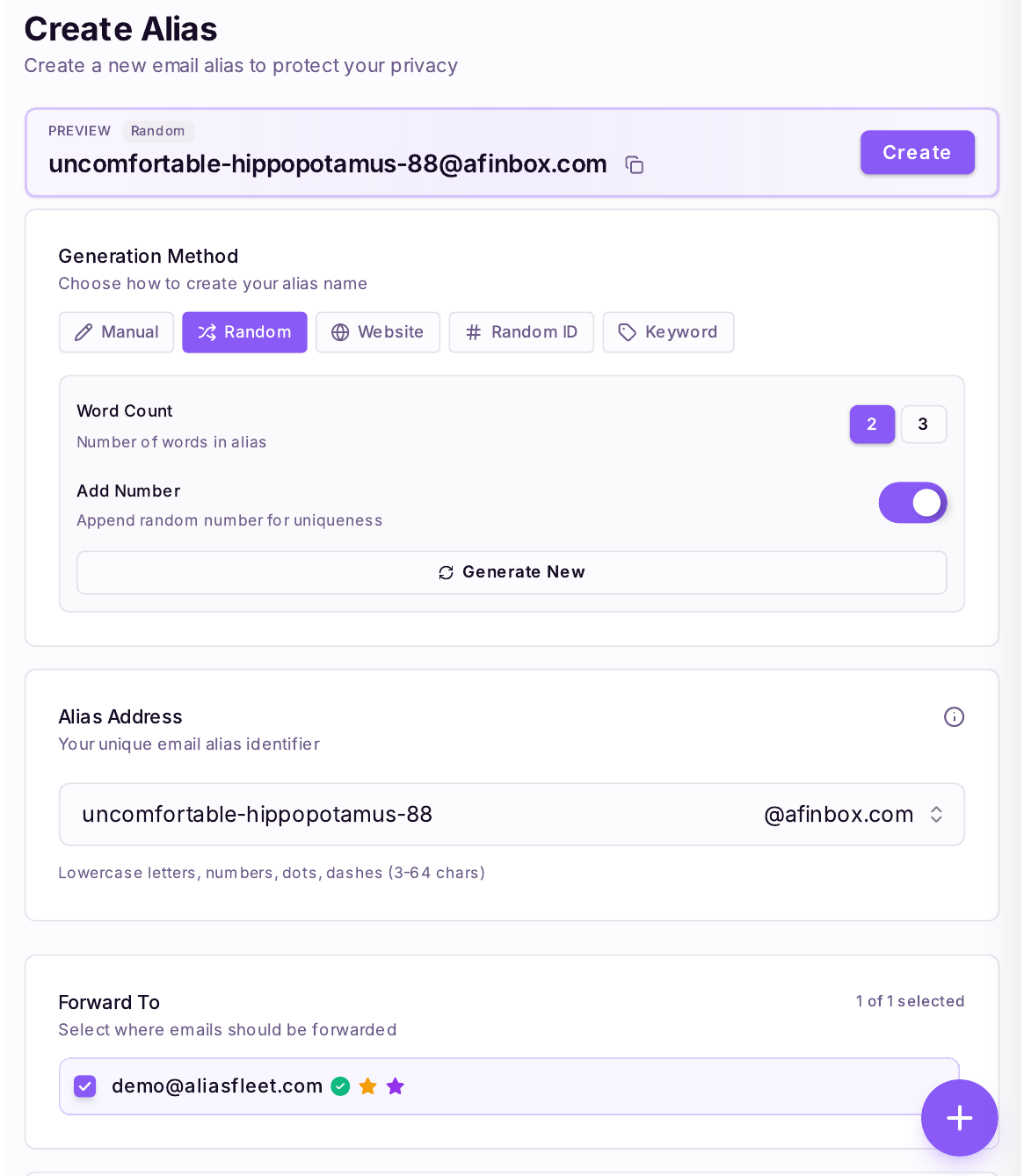
Permanence matters as much as separation, because a money account needs a stable address for password resets, statements, dispute notices and future sign-in checks, and an address that stops working can lock the account holder out. The alias therefore stays alive permanently. If it starts to receive spam or phishing, it is disabled in one click and replaced with a fresh alias for the same app, and the provider account is updated to the new address before the old one is closed. No published study was found that measures the effect of alias separation on payment app fraud, so no figure is claimed for that effect. For bank accounts themselves the rule is stricter, since the bank receives a permanent real address rather than an alias, as explained in the guide to a separate email for banking.
Sign-in checks for the app and the inbox#
Two-factor authentication on the transfer app is the first check. PayPal describes the mechanism plainly: with two-step verification enabled, sign-in needs both the password and a different code each time, and PayPal will never ask for that code over the phone, email or text. That rule appears on the PayPal account security page. Venmo applies the same rule to its six-digit code, and Wise offers two-step verification, which it describes as a necessary layer of security on the account and states helps stop access even when the password is known, as set out in the Wise two-step verification guide.
The inbox needs the same treatment, because it guards the reset path. A unique password for the email account closes the simplest route in, and two-factor authentication on the email account adds a second barrier. A code that arrives without a sign-in attempt suggests that someone else may be trying to enter the account. The response is to change the email password and review recent sign-in activity.
Sender checks#
Every payment message is checked against the provider published rules before any link is clicked or any reply is sent (see table).
| Provider | Genuine sender domain | Rule stated by the provider |
|---|---|---|
| Zelle | @zellepay.com | No upgrades; no Gmail, AOL or Yahoo address is used |
| Venmo | venmo.com | Mail uses the full name or business name; the code is never requested |
| Cash App | @cash.app, @square.com, @surveys.squareup.com, @squareup.com | Support never asks for a sign-in code or PIN |
| Wise | wise.com | Genuine mail uses the first name; links lead to wise.com |
The entries in the table rest on the providers' own pages, as stated on the Zelle phishing page, in the Venmo common scams guide, in the Cash App guide to social engineering attacks and in the Wise phishing guidance.
The check covers the sender domain, the greeting and the request. A generic greeting such as Dear user is a warning sign. Venmo states that its mail typically uses the full name or the business name. A request for a password, a sign-in code, a PIN or a payment to release funds is a warning sign on every provider listed here. Wise states that it will never ask for a password, login details over a phone call, or one-time passcodes, or ask for money to be moved to a safe account, as set out in the Wise scam awareness guide. The FTC phishing guidance adds the general rule: a legitimate company will not email or text with a link to update payment information.
Payment verification outside email#
Payment instructions are verified through a channel outside the email thread. A new bank detail, a changed recipient, or a request to send money to a different account is confirmed by opening the app directly. The recipient can also be called on a number already held. Replying to the message that carried the new details does not confirm anything, because email is the channel the attacker can fake.
A payment is confirmed inside the app or the bank account, never from a screenshot or an email, because a screenshot is easy to fake and an email can be forged.
The NCSC phishing guidance describes phishing as scam email, text or calls designed to lead the victim to a website that steals bank details.
Reporting a suspicious message#
A suspicious message is left unclicked, and the account is checked inside the app. Venmo asks that a suspicious email be forwarded as an attachment to phishing@venmo.com and then deleted, per the Venmo reporting page. The FTC asks that a phishing email be forwarded to reportphishing@apwg.org, and a phishing text to SPAM (7726). A loss or an unauthorised transfer is reported at once to the bank or the app, then to the FTC at ReportFraud.ftc.gov and to the FBI at the Internet Crime Complaint Center.
Recovery turns on who sent the payment. When a scammer moved the money using the account holder login or a code obtained by trickery, the transfer is generally an unauthorised transfer under Regulation E, which sets error-resolution duties for the institution holding the account, though how those duties apply to a payment app as opposed to the bank is contested, since the CFPB's Zelle allegations on this point were never decided, as set out in the Regulation E error-resolution rule. When the account holder sent the payment personally because of a lie, the law as written does not promise a refund, and any money back depends on the bank's or app's own policy. The Recording Law guide to payment app scams explains that distinction. Provider rules differ by country and by app, and refund outcomes vary by whether the transfer was authorised or unauthorised. The email checks here cover the inbox side of the risk only, under US federal rules (Regulation E) and UK guidance from the NCSC and Wise UK.
Email aliases and money transfer accounts#
AliasFleet provides email aliases that forward to a verified destination inbox. A separate alias can be created for each money transfer app, following the guide to creating aliases, and each alias can be disabled in one click when it starts to receive unwanted mail. The Free plan includes 10 active aliases and 1 verified destination inbox, and the Pro plan costs $12 per month with unlimited active aliases, as listed on the AliasFleet homepage. AliasFleet does not hold money, process transfers, or reverse payments. Recovery after a loss stays with the bank or the transfer provider.
